


UnitedHealthcare
4.625.80K Reviews
App Specs
- Version
- 3.16.0
- Updated On
- License
- Free
- Downloads
- 5,000,000+
- Developer
- UNITED HEALTHCARE SERVICES, INC.
- Categories
- Medical
- Platform
- Android, iOS
Screenshots
 Analysis by AppCompare
Choosing a healthcare app is less about collecting features and more about making a few important tasks easier when you need them. UnitedHealthcare is most useful as a companion to a UnitedHealthcare plan: it brings plan information and care-finding into one place, so I can spend less time switching between paperwork and searches. I’d recommend it to members who want a convenient starting point for checking coverage or locating care, while keeping in mind that an app can help organize decisions without replacing a direct conversation with a provider or insurer.
Where it helps with everyday decisions
The practical value becomes clearer when a health question arrives at an inconvenient moment. Imagine I’m away from home and need to arrange a routine appointment. I can use the app to look for providers nearby rather than begin with a general web search, then check plan details before deciding whom to contact. That sequence is useful because a convenient location alone does not tell me whether care fits my plan. I’d still confirm important coverage details before booking, but having both tasks close at hand makes the search less scattered.
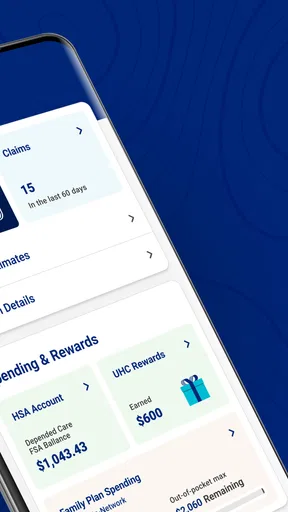
It also suits the small administrative checks that are easy to put off: reviewing benefits before scheduling a service, keeping an eye on a deductible, or checking what a plan says is covered. These details can affect the next step, but they are not always easy to remember from a letter or a past call. I find it helpful to have a mobile reference available when a question comes up, rather than waiting until I’m back at a computer.
A useful habit is to check plan information before making a decision that may lead to a bill, then contact the relevant office if the wording leaves room for doubt. The app can make information easier to reach, but it should not be treated as a guarantee that a specific service, clinician, or appointment will be covered in every circumstance. That distinction matters: convenience is real, while final costs and care arrangements can depend on the details of a person’s plan.
Finding care without treating search results as a recommendation
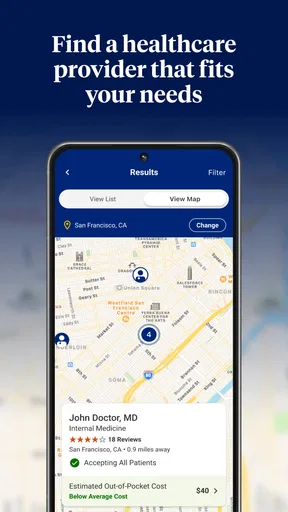
Provider search is another sensible use, especially when I’m unfamiliar with an area or want to compare nearby options. Ratings and reviews can offer context, and the map view makes it easier to judge whether a location is practical. I would use those details as a shortlist, not as a substitute for checking whether the provider is suitable for my needs or available to see me. A high rating cannot answer every clinical or insurance question.
For a more deliberate search, I’d start with the kind of care I need and the area I can reasonably reach, then use the results to identify candidates. Before booking, I’d verify the provider’s current participation and ask the office about appointment availability. This extra check is worthwhile because directories and real-world schedules serve different purposes: the app helps me discover options, while the provider’s office can confirm the practical details for a particular visit.
Compared with a general maps app, the healthcare search has a more relevant starting point because it is tied to finding care rather than simply locating businesses. Compared with calling an insurer first, it can be more convenient for browsing on my own. But if I have a complicated coverage question, need help interpreting a benefit, or cannot find an appropriate provider, a direct call may be the better route. I see the app as a useful first step, not the only channel worth using.
Worth Reading Before You Choose

Flipboard Shows What News Apps Must Do Beyond the Feed

Switching to Android Auto Means Rethinking Your Driving Routine

Google Calendar Makes a Crowded Week Easier to Manage

Ludo King Makes the Most of the Minutes Between Plans

Baby Panda World Brings Quick Play to Modern Phones, but Its Game Library Feels Busy

ESPN’s Live Game View Makes Following Close Games Easier
Records and reminders work best with a little care
Keeping documents together can reduce the familiar scramble before an appointment or insurance conversation. If I choose to store records in the app, I’d first decide which documents are genuinely useful to have available on my phone, rather than treating it as a place to copy every piece of medical paperwork. A current document that I may need to reference is more useful than a large, unorganized archive. I’d also take care with the phone itself, since health information deserves the same attention I give other sensitive personal material.
Reminders can help with follow-through when I’m juggling appointments and routine health tasks. I’d use them as prompts to check what needs doing, not as proof that a prescription has been renewed or that an appointment is confirmed. A reminder is only helpful if the underlying detail is current, so it’s sensible to verify time-sensitive arrangements with the relevant provider or pharmacy. That small distinction keeps a convenient nudge from becoming a source of misplaced confidence.
There is a trade-off here: putting plan details, care searches, documents, and prompts in one app can make everyday administration feel more orderly, but it also asks me to maintain another digital space. Someone who rarely uses a phone for health tasks may prefer paper notes or a call, while a person who already handles appointments and insurance on mobile is more likely to appreciate the convenience.
In the ever-expanding universe of healthcare apps, UnitedHealthcare is like finding a trusty companion in a galaxy of choices. If you’ve ever felt overwhelmed by medical jargon or the endless paperwork associated with health insurance, this app might just be your new best friend.
Your Health, Simplified
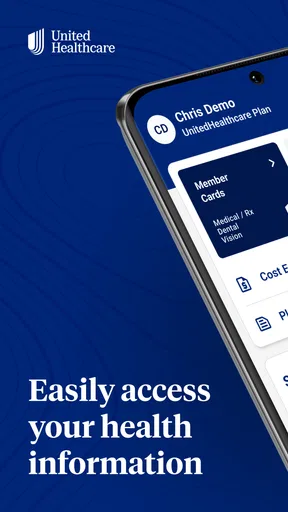
Let’s dive right into what makes UnitedHealthcare stand out. Right off the bat, you’re greeted with a sleek and intuitive interface. Navigating through its features feels like a breeze, even if you’re like me and not the most tech-savvy person on the planet. The app’s design is simple but effective, focusing on user-friendliness which is a major win for anyone who’s not a fan of overly complicated apps.
Key Features That Shine
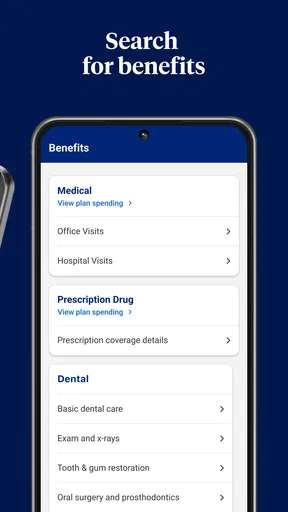
So, what can you actually do with this app? Well, quite a bit! First off, it allows you to easily manage your health plan details. You can view your benefits, track your deductible, and find out what’s covered. It’s like having a personal assistant who’s always ready to give you the lowdown on your insurance plan.
Another fantastic feature is the ability to search for doctors and healthcare providers. The app provides ratings and reviews, so you can make informed choices about who’s best to handle your healthcare needs. Plus, the map integration is a sweet touch, letting you find nearby providers without having to switch apps.
Stay Organized and Informed
If you’re like me and often forget where you’ve stashed those important medical documents, you’ll love the document storage feature. You can upload and store your medical records securely in the app. No more rifling through stacks of paper or stressing about losing important info!
Moreover, the app keeps you updated with personalized alerts and reminders. Whether it’s a gentle nudge to refill a prescription or a heads-up about scheduled appointments, it’s like having a little digital assistant keeping you on track.
What to expect before installing
This is a free medical app from UNITED HEALTHCARE SERVICES, INC., and it makes the most sense for people whose health coverage is with UnitedHealthcare. It is rated for Everyone, has an average rating of 4.6 from around 189,000 ratings, and has been installed over 5 million times. Those figures suggest that many people use it, but they do not tell me whether its tools will suit a particular plan or personal routine.
The app was released on September 26, 2018, and its current version is 2.96.0, with Android 8.0 as the minimum operating system requirement. I’d check that compatibility before installing, especially if I’m using an older phone. The most important practical question is whether I can sign in and see the plan information I need; without a relevant UnitedHealthcare plan, much of the insurance-management value may not apply.
That makes the audience fairly specific. I’d consider it for a member who prefers checking benefits and searching for care on a phone, or for someone who wants a central place to keep track of health-related administration. I’d be less enthusiastic about recommending it to someone seeking a general medical reference, a way to compare every insurer, or a replacement for clinical advice. Its focus is the UnitedHealthcare experience, not healthcare in the abstract.
Where the convenience has limits
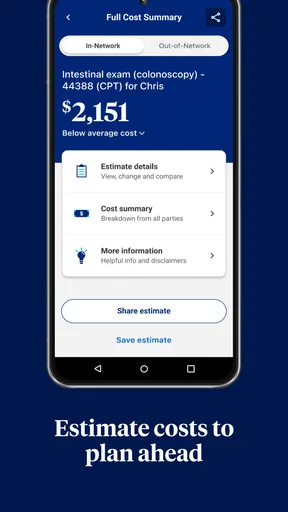
The main limitation is also part of the app’s purpose: plan information is most useful when it is relevant to the person signed in, and insurance language can still require interpretation. A screen can help me find a benefit, but it cannot always resolve a nuanced question about a planned service or an unexpected charge. When the financial stakes are meaningful, I would use the app to prepare a specific question and then confirm the answer with the insurer or care provider.
I also wouldn’t assume that finding a clinician in a directory automatically settles every detail of a visit. Ratings, reviews, and location help with discovery, but they are only pieces of the decision. I’d verify that the provider is appropriate for the care I need, check current plan participation, and confirm availability directly. This is a little less effortless than choosing the first convenient result, but it is a more reliable workflow.
Another consideration is whether I want sensitive records on a phone at all. Document storage can be handy, yet it is optional in practice: I can use the app for plan checks or provider searches without making it my entire medical filing system. If I do keep documents there, I’d be selective and make sure I’m comfortable with the device access and sign-in habits I use. People who prefer not to store health paperwork digitally can still weigh the other tools on their own merits.
A sensible fit, not a universal solution
For a UnitedHealthcare member, I think the app earns its place when it saves a little effort across recurring tasks: checking a benefit before arranging care, looking for nearby providers, or keeping a reminder in view. The best approach is to treat it as a practical member tool, use its information to narrow down the next step, and verify details when coverage or scheduling matters. It is less compelling for someone outside that plan ecosystem or anyone expecting the app to make healthcare decisions on their behalf.
In today’s fast-paced world, managing healthcare can be a daunting task. But with UnitedHealthcare, it feels a bit more manageable. It’s user-friendly, packed with features, and incredibly convenient. Whether you’re tech-savvy or a self-proclaimed tech dinosaur, this app makes navigating your healthcare needs easier.
Overall, if you’re looking for a reliable app to help simplify your health insurance experience, this is definitely worth a download. It’s like having a healthcare guide right in your pocket, ready to assist at a moment’s notice.
So go ahead, give it a try, and see for yourself how UnitedHealthcare can make managing your health a little less stressful and a lot more efficient.
Pros
- User-friendly interface for easy navigation.
- Comprehensive health information access.
- Seamless integration with fitness trackers.
- 24/7 customer support availability.
- Personalized health recommendations.
Cons
- Limited customization options for alerts.
- Occasional app crashes reported by users.
- Some features require premium subscription.
- Complex registration process for new users.
- Inconsistent updates may cause issues.
FAQs for UnitedHealthcare
What features does the UnitedHealthcare app offer?
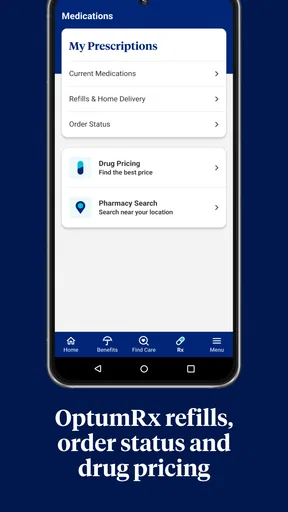
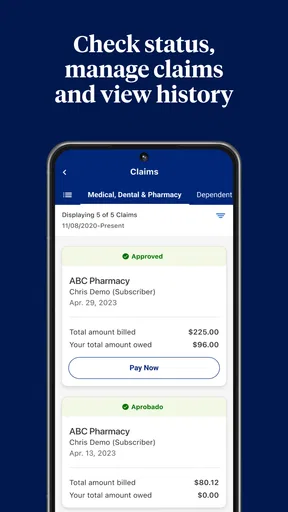
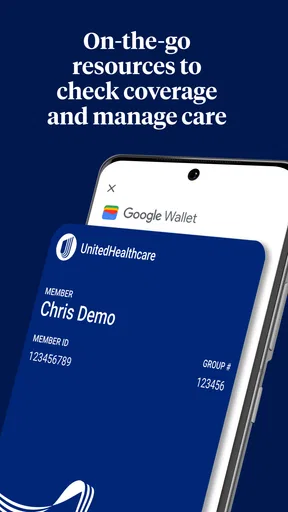
The UnitedHealthcare app provides a range of features designed to help users manage their healthcare needs efficiently. These include access to personal health records, the ability to find in-network doctors and facilities, viewing and sharing insurance cards, managing prescriptions, and tracking claims and expenses. The app aims to simplify healthcare management by providing all essential tools in one place.
Is the UnitedHealthcare app available for both Android and iOS devices?
Yes, the UnitedHealthcare app is available for both Android and iOS platforms. Users can download the app from the Google Play Store for Android devices and the Apple App Store for iOS devices. It is designed to ensure a seamless experience across both operating systems, allowing users to manage their healthcare information on the go.
How secure is my personal information on the UnitedHealthcare app?
The UnitedHealthcare app employs robust security measures to protect users' personal and health information. It uses encryption and secure login protocols to safeguard data. Users are encouraged to use strong passwords and enable any available biometric authentication features, such as fingerprint or facial recognition, to enhance security further.
Can I manage multiple family member accounts through the UnitedHealthcare app?
Yes, the UnitedHealthcare app allows you to manage multiple family member accounts. You can view and handle health records, claims, and benefits for dependents covered under your plan. This feature is especially useful for families, as it centralizes healthcare management into a single, accessible platform, streamlining tasks like appointment scheduling and prescription refills.
Does the UnitedHealthcare app offer customer support if I encounter issues?
The UnitedHealthcare app provides access to customer support to assist users with any issues or questions. You can reach out to support directly through the app, where options such as live chat or phone support are typically available. Additionally, the app offers a comprehensive FAQ section to address common concerns and provide immediate assistance.


